
Call Reminder Pro3.4 - Get APK
You'll be able to download in few seconds.
Publisher Description
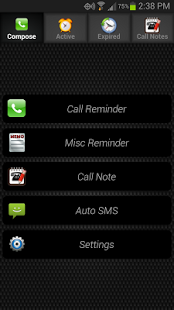
If you are using the free version of Call Reminder, please upgrade through in-app purchase.
Reminders for every occasion! Call Reminder provides a fast and convenient way to schedule reminders for virtually any occasion. Great for professionals or anyone else needing
a little more organization in their busy schedule.
Please help translate Call Reminder to your language: https://crowdin.com/project/call-reminder/invite
Call Reminders
- Quick creation of callback reminder after each phone call
- After-call window provides options for quickly creating a reminder, call note, or calendar event.
- Reminder notes shown on call screen during calls with that specific contact
- Create call reminder from call log
- Option for automatic creation of call reminder for all calls or missed calls only
- Auto-complete text box for selecting contact during reminder creation, just start typing and results are filtered based on what you type
- Add repeating alerts to each reminder
- Add reminder to device calendar
- Choose different ringtone for each reminder
Miscellaneous Reminders
- General purpose reminders for any occasion (meetings, grocery, laundry, etc.)
- Attach images
- Add repeating alerts to each reminder
- Add reminder to device calendar
- Choose different ringtone for each reminder
SMS Reminders
- Schedule SMS messages to be sent automatically
- Add confirmation prompt at scheduled time of sending or choose to have SMS sent automatically without user intervention.
- Schedule repeating SMS reminders
Call Notes
- Create call notes for any contact that will be displayed on call screen during all calls with that contact
- Edit and create new notes while in call
Features
- Option for persistent notifications that require user intervention before dismissing
- Choose how long reminders remain in database after expiration
- Option for 24-hour time format
- Calendar Integration (Android 4.0+)
- New features coming!
About Call Reminder Pro
The company that develops Call Reminder Pro is Duckbone Apps. The latest version released by its developer is 3.4.
To install Call Reminder Pro on your Android device, just click the green Continue To App button above to start the installation process. The app is listed on our website since 2016-04-14 and was downloaded 0 times. We have already checked if the download link is safe, however for your own protection we recommend that you scan the downloaded app with your antivirus. Your antivirus may detect the Call Reminder Pro as malware as malware if the download link to com.duckbone.callreminder.pro is broken.
How to install Call Reminder Pro on your Android device:
- Click on the Continue To App button on our website. This will redirect you to Google Play.
- Once the Call Reminder Pro is shown in the Google Play listing of your Android device, you can start its download and installation. Tap on the Install button located below the search bar and to the right of the app icon.
- A pop-up window with the permissions required by Call Reminder Pro will be shown. Click on Accept to continue the process.
- Call Reminder Pro will be downloaded onto your device, displaying a progress. Once the download completes, the installation will start and you'll get a notification after the installation is finished.
Program Details
System requirements
Download information
Pricing
Version History
version 3.4
posted on 2016-04-14
Version 3.4,- Hourly option for repeat reminders,- Compatibility with Android Marshmallow's new Doze feature,- Dialer shortcut on main screen
version 2.42
posted on 2013-05-31
Several fixes and updates
Disclaimer
External Download
We do not host Call Reminder Pro on our servers. We did not scan it for viruses, adware, spyware or other type of malware. This app is hosted by Galad and passed their terms and conditions to be listed there. We recommend caution when installing it.
The APK Download link for Call Reminder Pro is provided to you by apps112.com without any warranties, representations or guarantees of any kind, so access it at your own risk.
If you have questions regarding this particular app contact the publisher directly. For questions about the functionalities of apps112.com contact us.
